Tag: ai

  • WordPress 7.0 and The Slopocalypse: The New Dead Internet

    WordPress 7.0 and The Slopocalypse: The New Dead Internet

    I give up.

    I’m sitting on my balcony. A translucent plastic bag is caught in the tangled nest of power lines in front of the main road. It has been there for three weeks, flapping rhythmically in the humid, smog-choked exhaust. It’s tattered, sun-bleached, and utterly fucking useless, yet it refuses to disintegrate. It is, in every sense, the perfect atavistic metaphor for the “Open Web” in 2026: a piece of trash that everyone sees, no one fixes, and that will eventually cause a short circuit that burns the whole block down.

    Then WordPress 7.0 was officially released on May 20th, 2026.

    As a plugin developer, I had received the announcement a week in advance, at 02:12 – unfortunately, my most productive time in this timezone –, the “WordPress Release Squad” (a title that suggests tactical precision but delivers the soul-crushing optimism of a municipal dental convention) slid into my inbox. The subject line read: “WordPress 7.0 is imminent! Are your plugins ready?”

    If I only had known at this point, since this whole thing had already started at least half a year ago. The first alpha version was out on November 12, 2025.

    In the email, the “Squad” announced that version 7.0 is shipping on May 20th, 2026, which is what happened, after a delay of the initial release date in April. They announced a “fresh coat of paint” called the Modern admin theme. And, buried in the bullet points like a landmine in a sandbox, they announced the new “AI Client” and “Abilities API”.

    This is where the story stops being a software update and becomes a eulogy.

    The Thirty-Hour Joke

    To understand the sheer, crystalline – though private – absurdity of this moment, you need to know what I’ve been doing over the last few weeks. I am a Senior Full Stack Developer. My time is expensive, and my patience for repetitive manual labor is nonexistent.

    Crushed developer upon release of WordPress 7.0
    Yes, i am fully aware of the irony that these images are created using ai

    So, I built a plugin. I didn’t vibe-code it. I built it.

    Its purpose was simple, elegant, and necessary: it hooked into the WordPress upload pipeline (wp_handle_upload_prefilter, for the nerds) and used a vision LLM by Groq, which for a long time churned out free API keys as if it hadn’t heard of the buzzing datacenters that could keep entire countries running, to look at the entropic filth of a file named DSC_8291_FINAL_v2.jpg and automatically rename it to sunburnt-foreigner-drinking-cheep-beer.jpg. It also generated alt="..." – a notoriously important detail for SEO, as we all know. It was a clean solution to a problem that has plagued the internet since the invention of the digital camera.

    I called it “AI Image Renamer.” You know, because that’s what it did.

    I spent thirty hours of my life writing this. Not generated hours. Actual, linear, human hours. The kind you do not get back. I burned through a nontrivial amount of my own LLM API credits to run test after test after test. I built a damn VitePress documentation site. I designed a landing page for a future PRO version. The code was pristine, if I may be so bold as to say this about my own creation.

    Then, I submitted it to the WordPress Plugin Review team.

    “Too Generic”

    Now, if you have never dealt with this specific cabal of open-source bureaucrats, imagine a DMV run by people who think reading PHP codebase diffs is a substitute for a personality. They sent me an email listing a Kafkaesque array of demands. They forced me to change the name because “AI Image Renamer” was apparently too “generic” and violated their brand guidelines. I was not allowed to use my @gmail account and had to create one for my real website, kolja-nolte.com. I think you can imagine the level of absurdity we’re talking about here.

    It was reviewed by the reviewers, who seem to guard the WordPress repository with the same misplaced heroism as a mall security guard defending a Cinnabon. The name was apparently “too generic”; it failed to meet their highly specific, utterly arbitrary nomenclature guidelines. But I gave in; all these hours, they shouldn’t have been for nothing. So I renamed it Viscribe. You know, something between “vision” and “scribe”. I jumped through every pedantic hoop. I submitted the final, sanitized, perfectly compliant version literally hours before I received the WordPress 7.0 announcement email.
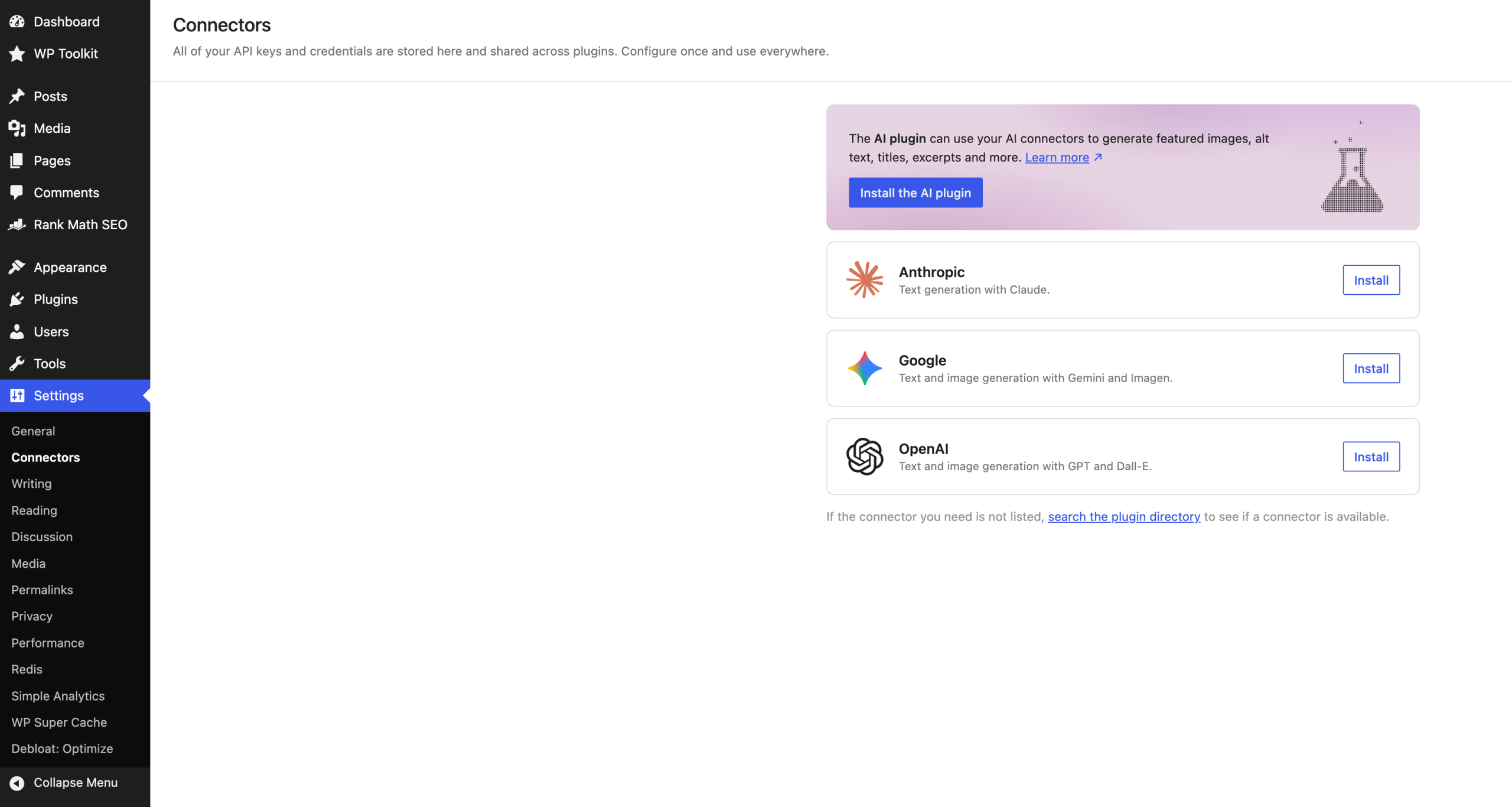
    Connectors page with ai plugins and installation options
    The new wordpress 7. 0 and its ai “connectors”

    And what does WordPress 7.0 introduce natively, baked right into the core?

    “Alt Text Generation” via vision models.

    Cool.

    They didn’t just move my cheese. They paved over the farm, built a state-sponsored cheese factory, and invited 43.5% of the internet to come and get it for free.

    Please, do not mistake this for whining. I don’t care about Viscribe’s death. My ego will survive the loss of a freemium plugin that I can still use on one of my many websites, including this one. The tragedy here is not my wasted weekends; the tragedy is what WordPress has actually built, how they built it, and what it is about to do to human knowledge. So, let’s get to that.

    The Vault is Open, the Guards are Dead

    Let’s look at the technical architecture of this impending disaster. WordPress 7.0 introduces the “Connectors API”. The idea is that you go into your dashboard, select the AI provider of your choice (OpenAI, Anthropic, or Google), and paste in your API key. Suddenly, your CMS has a brain. Or, if you prefer the more accurate description: a very advanced autocomplete.

    Here is the punchline, and I want you to read this carefully: There is no encryption.

    Sitting here, having installed WordPress 7.0 on this very blog, there is no pull request in the core repository (to be fair, there is one in the plugin version) that proposes encrypting these API keys in the database. Your digital API key – the alphanumeric string that is directly tethered to your actual, real-world credit card – is stored in the wp_options table in plain, readable text.

    Let that sink in.
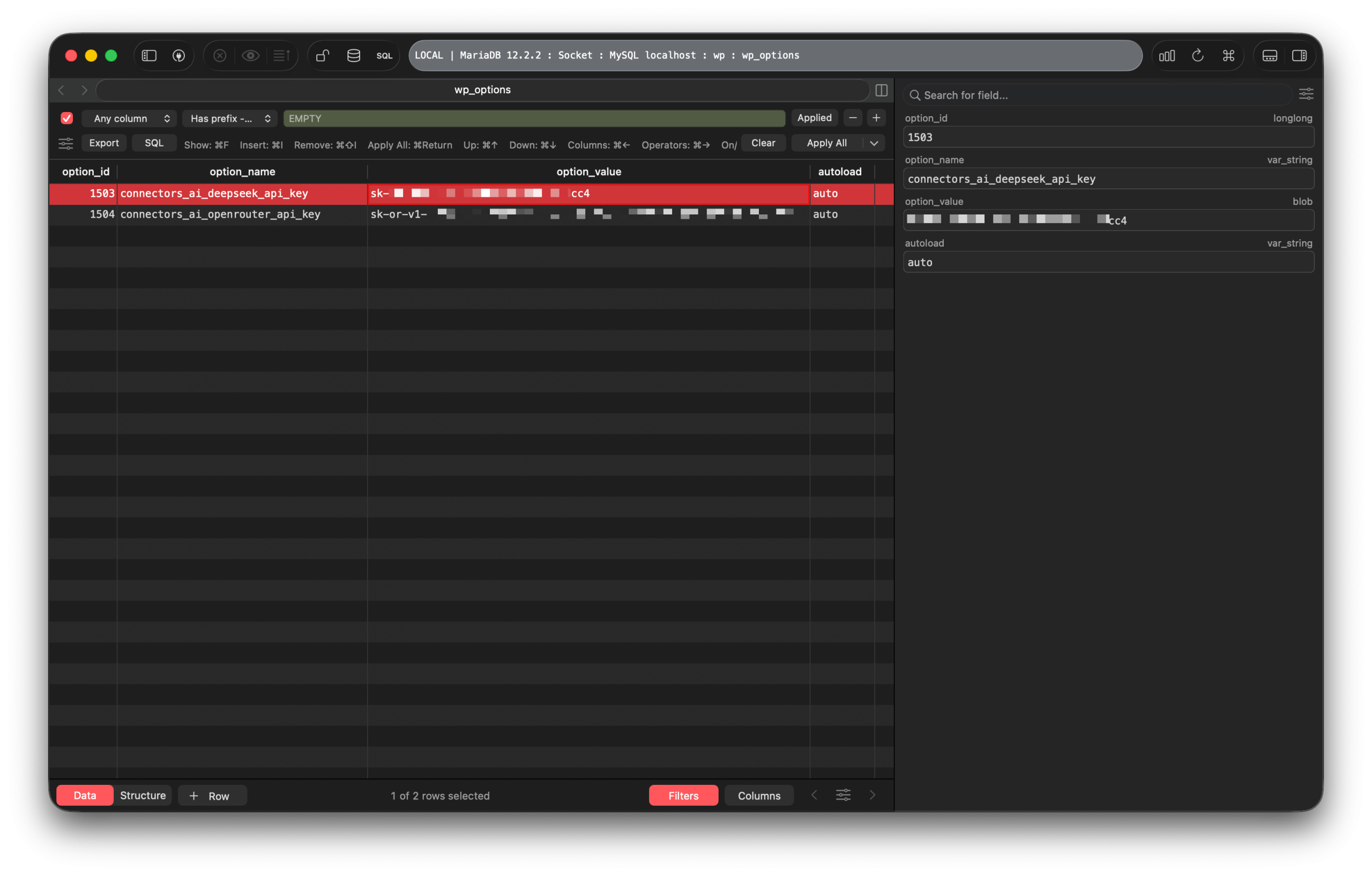
    Mariadb database interface with wp options table selected
    Click on the image to view it in a larger size

    WordPress, a platform so notoriously insecure that getting hacked is considered a rite of passage for small business owners, has decided that the best way to handle billing-enabled API keys is to just leave them under the digital doormat. It’s a level of architectural negligence that borders on the avant-garde. If a script-kiddie compromises a forgotten dental practice blog running a vulnerable slider plugin on WordPress 7.0, they don’t just get to deface the homepage anymore. They get to harvest an Anthropic API key and run their own crypto-scam LLM farm on the dentist’s dime.

    Security guards ignoring threats while hackers steal encryption keys freely
    Thank you for your api key

    Because releasing a version worldwide with unencrypted API keys in the database is so dumb that all these months seem to have not be enough to address this cause. That’s why I have no shame in giving you the SQL syntax to query them:

    SELECT
    	*
    FROM
    	`wp`.`wp_options`
    WHERE
    	(BINARY `option_id` LIKE 'sk-%')
    	OR (BINARY `option_value` LIKE 'sk-%')
    ORDER BY
    	`option_id`
    LIMIT
    	300
    OFFSET
    	0;
    SQL

    This one, as you can see, will check for API keys that start with sk-, which are a lot of providers. But don’t worry, if yours is PPLX, as in: Perplexity, I have you covered:

    SELECT
    	*
    FROM
    	`wp`.`wp_options`
    WHERE
    	`option_name` LIKE '%connectors_ai_%'
    ORDER BY
    	`option_id`
    LIMIT
    	300
    OFFSET
    	0;
    SQL

    Or just look inside wp_options – the table where all the plugin secrets are “hidden”. We’ll run a straightforward SQL query to find the one named connectors_ai_. The core team of WordPress 7.0 thought this would be the best naming convention to store different provider keys.

    Oh, you know, while we’re at it, and eventually every 14-year-old script kiddy “bragging” with “I use Arch, btw,” I go even further and give you the SQL query:

    SELECT
    	*
    FROM
    	`wp`.`wp_options`
    WHERE
    	`option_name` LIKE '%api_key%'
    ORDER BY
    	`option_id`
    LIMIT
    	300
    OFFSET
    	0;
    SQL

    And why not a script itself? But this once, I offloaded it to GitLab Snippets. ~30 lines of code, that’s all it takes. Your only requirement: access to either the (S)FTP/SSH to drop the file into the root directory, or installing one of the file browser plugins that allow you to simply create one.

    And it gets better. In WordPress 7.0, you can add multiple “Connectors” via plugins. But if you have more than one hooked up, the system offers zero granular routing. Which provider summarizes the text? Which one generates the image? Who knows. Let them fight, I guess? It is a system designed by people who understand the buzzwords of AI but possess a touching, almost childlike indifference to how software is actually used in the wild, not too far from the infamous introduction of the Gutenberg editor (I just checked, out of 3,871 ratings, it achieved: 2.1).

    The “Experiments” in Automated Mediocrity

    But the true horror of WordPress 7.0 isn’t the catastrophic security flaw. It’s the “AI Experiments” plugin, which will inevitably be merged into core, at least according to this article. It’s a laboratory of features that will soon become standard. I read through the testing reports. I looked at the capabilities. It is a masterclass in treating symptoms while ignoring the disease.

    Let’s review the arsenal:

    1. Excerpt Generation

    You write a post. You’re too tired (i.e., lazy) to summarize it. You click a button, and Claude or whatever LLM you’ve hooked up reads your post and writes the excerpt for you. We are now using machines to summarize texts that were likely generated by machines, for an audience of search engine bots that are also machines. The human is completely removed from the transaction, and would even make Google’s crawlers dizzy when trying to assess a website’s quality.

    2. Alt Text Generation

    The exact feature I built. You upload an image, and the AI describes it. It doesn’t rename it, though, as mine does. The testing reports call this “the standout feature” (WordPress 7.0 Release Notes). And it is. It is undeniably useful for SEO and accessibility. But it is also the final admission that we can no longer be bothered to describe our own visual reality. We need Elon Musk’s laughable “space servers” (or just a datacenter in California) to look at our vacation photos and tell a blind user, “A person standing in front of a building.”

    3. Title Generation

    You click a button, and the system generates three to five title suggestions. The modern internet is entirely driven by the clickability of headlines, and we are now outsourcing psychological manipulation to algorithms. It spits out variations of the same tired, high-engagement, clickbaity AI slop you’d expect.

    4. Review Notes

    The AI will also analyze your post block by block and give you suggestions on grammar, accessibility, and SEO. You now have an automated editor sitting on your shoulder, enforcing a sterile, statistical average of “good writing.” It flags sentence fragments. It demands higher keyword density. It will systematically sand down any edge, any rhythm, any actual voice you might have had, until your text reads exactly like the documentation for a mid-tier SaaS product.

    5. Content Summarization

    For those moments when the generated excerpt isn’t enough, you can generate an “At a Glance” box. More compression. More flattening of information.

    WordPress 7.0 gives the masses a button for “Content Summarisation.” A button for “Title Generation.” A button for “Excerpt Generation.” As if the internet doesn’t have enough problems with AI-generated shit content.

    Welcome to the Slopocalypse

    We all know what is going to happen. The Dead Internet Theory is no longer a fringe conspiracy on Reddit; it is the official product roadmap of Automattic, the for-profit company behind the free .org version. WordPress powers roughly 478 million websites. Millions of non-technical bloggers, SEO grifters, and passive-income hustlers are about to realize that with WordPress 7.0, they never have to write a single word ever again.

    Imagine the lifecycle of a blog post in late 2026 with WordPress 7.0 installed:

    1. An AI agent scrapes a news article (which was likely written by an AI).
    2. The WordPress “Abilities API” intercepts it.
    3. The WordPress user clicks “Summarize Content.”
    4. The AI generates a 300-word block of aggressively beige, perfectly grammatical slop.
    5. The user clicks “Generate Title.”
    6. The user clicks “Publish.”

    Or you just use one of their documentations to look up a filter or action hook to do all of that automatically.

    The Digital Centipede

    Dark futuristic centipede with screens and people working nearby
    Enjoy your ai slop

    The internet will become a closed loop of algorithmic regurgitation. It will be a digital centipede where meaning is chewed up, digested, and shit out, losing context and humanity with every iteration, until the entire web is just trillions of tokens of polite, SEO-optimized noise.

    I am not angry about Viscribe. I said that before. My thirty hours are gone, and that is fine. Software development is essentially the practice of building sandcastles at the edge of the tide. You know the water is coming. Instead, what I am experiencing is a profound, heavy resignation.

    I look at the new Modern admin color scheme in WordPress 7.0. It is very clean. The View Transitions plugin makes sliding from one screen to the next feel smooth. The “Connectors” are mostly made by the company itself. The engineering required to build this interface is – and I have no problem admitting this – genuinely impressive. Yet, they have built this beautiful, fast, responsive interface solely to make it easier for us to stop doing what blogs were meant to do: being creative.

    The Upgrade That Went Too Far

    They are framing this as an “upgrade’’. They are wrapping it in a “sleek, new color scheme” with “seamless visual transitions”. It is efficient in the way that bureaucracy is efficient: technically in motion, spiritually dead.

    The plastic bag outside my window is still flapping, by the way. I used to find it annoying, a symbol of urban decay in this concrete jungle. Now, I look at it with a strange kind of fondness. At least the bag is real. At least it hasn’t been parsed, summarized, and rewritten by a language model to be “more engaging,” as WordPress 7.0 websites will undoubtedly. And WordPress 7.1 is already in development.

    I will close my tab now. I will leave the API keys in plain text where they belong. I will go downstairs, walk out into the Bangkok heat, and find a bar. I will order a drink and pay for it in cash. And when the bartender asks me how my day was, I will have to formulate the answer myself, using my own words, in real-time, without a single machine suggesting that I adjust my tone for “better engagement”.

    The internet is over. It was fun while it lasted. Enjoy the slop to come.


    Note: This post was updated on May 25th, 2026, at 00:11 to highlight and document how easy it is to steal the API keys of WordPress 7.0 AI users.

  • The dream of free or cheap AI is gone – now it’s Payday

    The dream of free or cheap AI is gone – now it’s Payday

    I pay for AI.

    That sentence alone would come as a shock to those who know me personally. No free AI; I actually gave money to a company, my hard-earned money, to gain access to both proprietary and open source LLMs. I changed my GitHub Education plan to “Pro” after they removed access to Copilot. It felt like a defeat.

    For years, I had lived the life of a digital parasite, thriving on student discounts, generous trial periods, obscure Chinese providers that I could only navigate by Chrome’s “Translate into English”, and – my favorite – the noble art of API key rotation: Finding a provider who offers a certain amount of tokens that resets on a daily basis, and then registering 10 times to receive 10 different API keys.

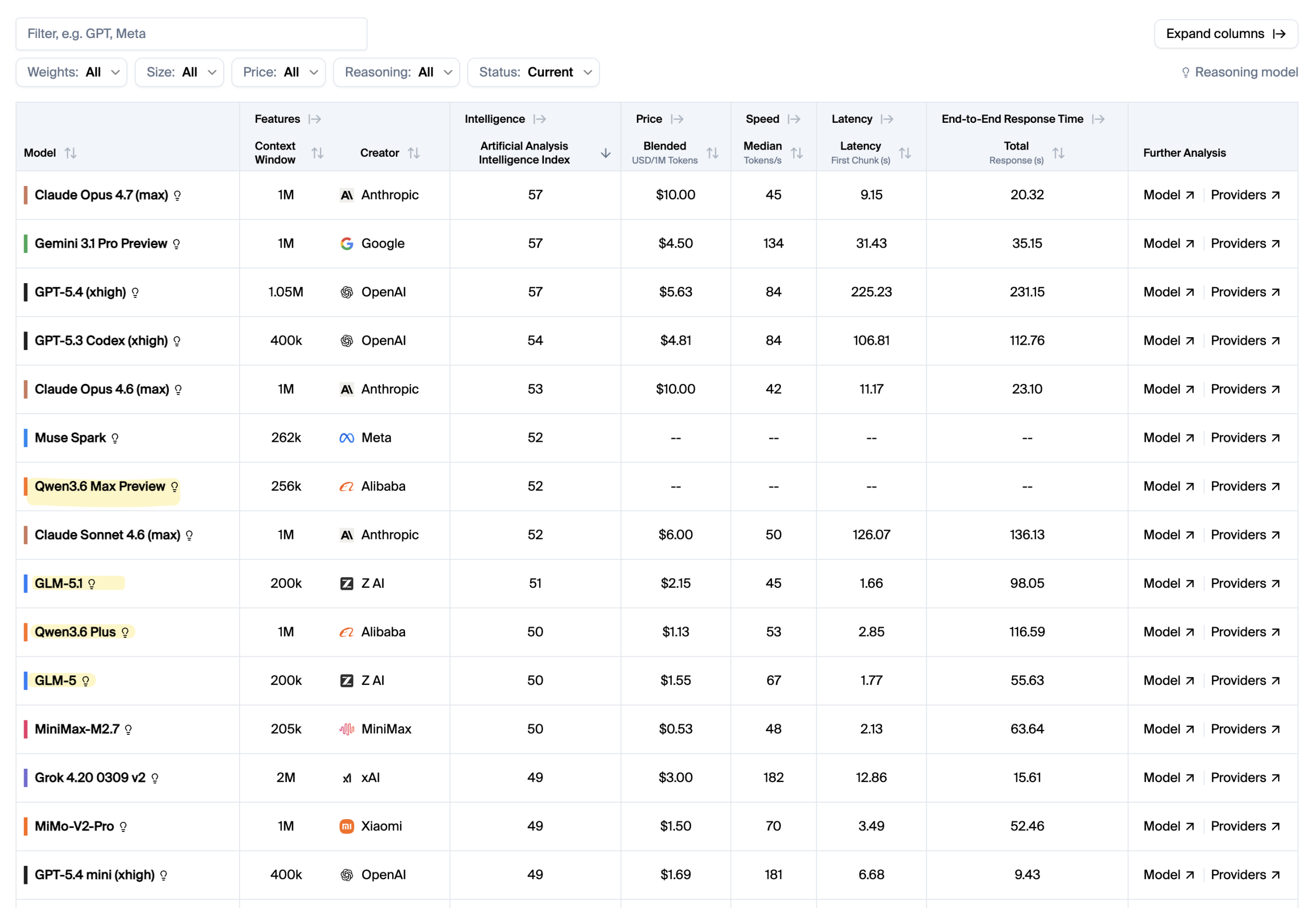
    Through iFlow’s CLI, iflow, I had an almost unlimited amount of tokens for open-source models that ranked at the top of every open-source benchmark: First GLM-4.7, then Kimi K2 Thinking, MiniMax 2.5, later GLM-5, and most recently GLM-5.1. Then there was Qwen, or, as I was used to typing it into my CLI, qwen. Qwen itself doesn’t have the absolute best models, I must admit, despite its plethora of LLMs that seemed to be being churned out on a daily basis. But they were fast and tailored to your needs. qwen3-coder-plus was a great tool to have for getting things done quickly and reliably.

    Ai model comparison table with specifications and performance metrics listed
    Top llms according to different benchmarks, with open source-models highlighted

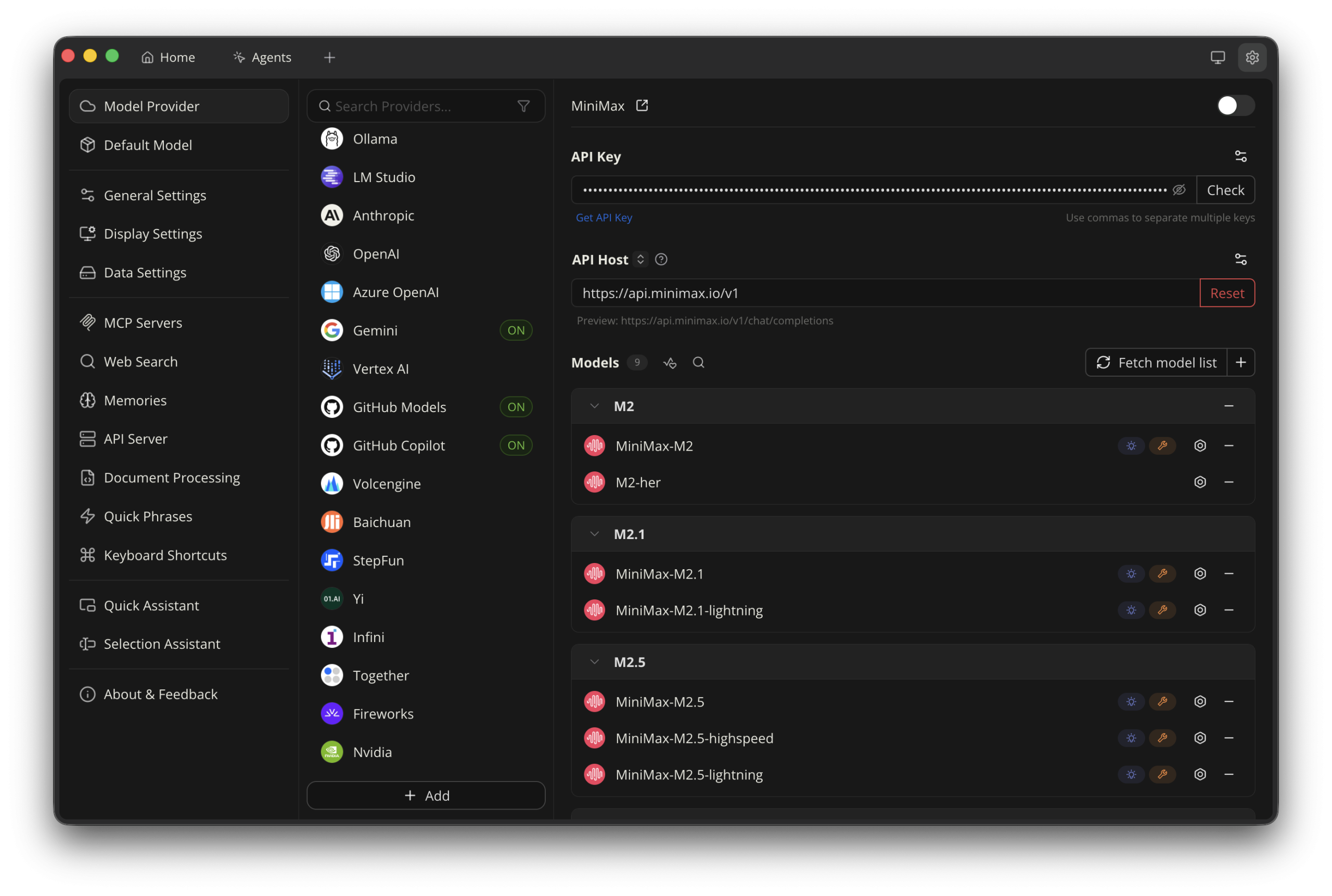
    All in all, I had access to probably every LLM – open source or not – that made it into the Leaderboard. And for all of them, I paid absolutely nothing. Not a single transaction happened; I simply registered more accounts with throwaway emails or even throwaway phone numbers. I managed them all in Cherry Studio, an app that bridges the gap between mere conversations and actual coding. The list of providers was so long that I only had to randomly click on one, then click the “Get API key…” link, and it led me straight to some provider whose names I immediately forgot, signed up multiple times, and kept rotating the fuck out of their API keys. You may hate me now.

    That era, ladies and gentlemen, seems to be coming to an end.

    Cherry Studio's list of model providers
    Cherry studio’s list of model providers, most of them using open source models

    The Subreddit as a Canary in the Coal Mine

    Since I was and still am an avid user of GitHub Copilot – with no more student discount despite being verified -, I subscribed to its unofficial subreddit, GitHub Copilot. This subreddit was also where I found the infamous email informing all “students” that they were separating the Copilot feature from the education plan and simply giving them access to the already-free base account, which is as useful as a sixth finger.

    The email, which arrived on March 12 and was “effective March 12, 2026”, caused a flood of posts on the GHCP subreddit. Little did they know there was much worse to come. It had actually been there the entire time, in the email that every “student” read thrice because of disbelief and confusion:

    (…) we will be making additional adjustments to available models or usage limits on certain features (…)

    Back then, this sentence was either overlooked or misinterpreted as in “we’re trying to balance this out and maybe opt for generous usage limits instead of taking away your beloved Claude Opus 4.6.” Check out the subreddit today, and I promise you’ll find at least 5 posts on the first page about “rate limits”.

    Their complaints are justified – mostly. I have very little pity left for vibe-coders who were running multiple instances of Copilot requests to basically do everything for them. But soon, actual students from Pakistan, like a good friend of mine who had just started learning the new technology and relied on free AI tiers, were unexpectedly rate-limited at a rapid pace.

    One might be inclined to forget who’s actually behind GitHub. It is Microsoft. Yes, that Microsoft that collected lawsuits like Pokémon cards, with its most infamous one in 1998, a landmark antitrust lawsuit accusing Microsoft of abusing its monopoly power by bundling its Internet Explorer browser with the Windows operating system. The 11-hour-long deposition video is still on YouTube, exposing a young Bill Gates trying to talk his way out of what it was: a fucking monopoly.

    For your next flight to Southeast Asia, the first 11 hours will be saved

    I don’t think I need to add anything more as to why Microsoft + GitHub + Copilot is a terrible formula. The effects, however, are felt, whether you like Microsoft or not (who the fuck likes Microsoft anyway 🤔). Their latest coup, barely a few hours old at the time I’m writing this: Claude Opus has been removed from the GitHub Pro plan and moved to Pro+, the one people paid around $10 for to get, well, access to models like these.

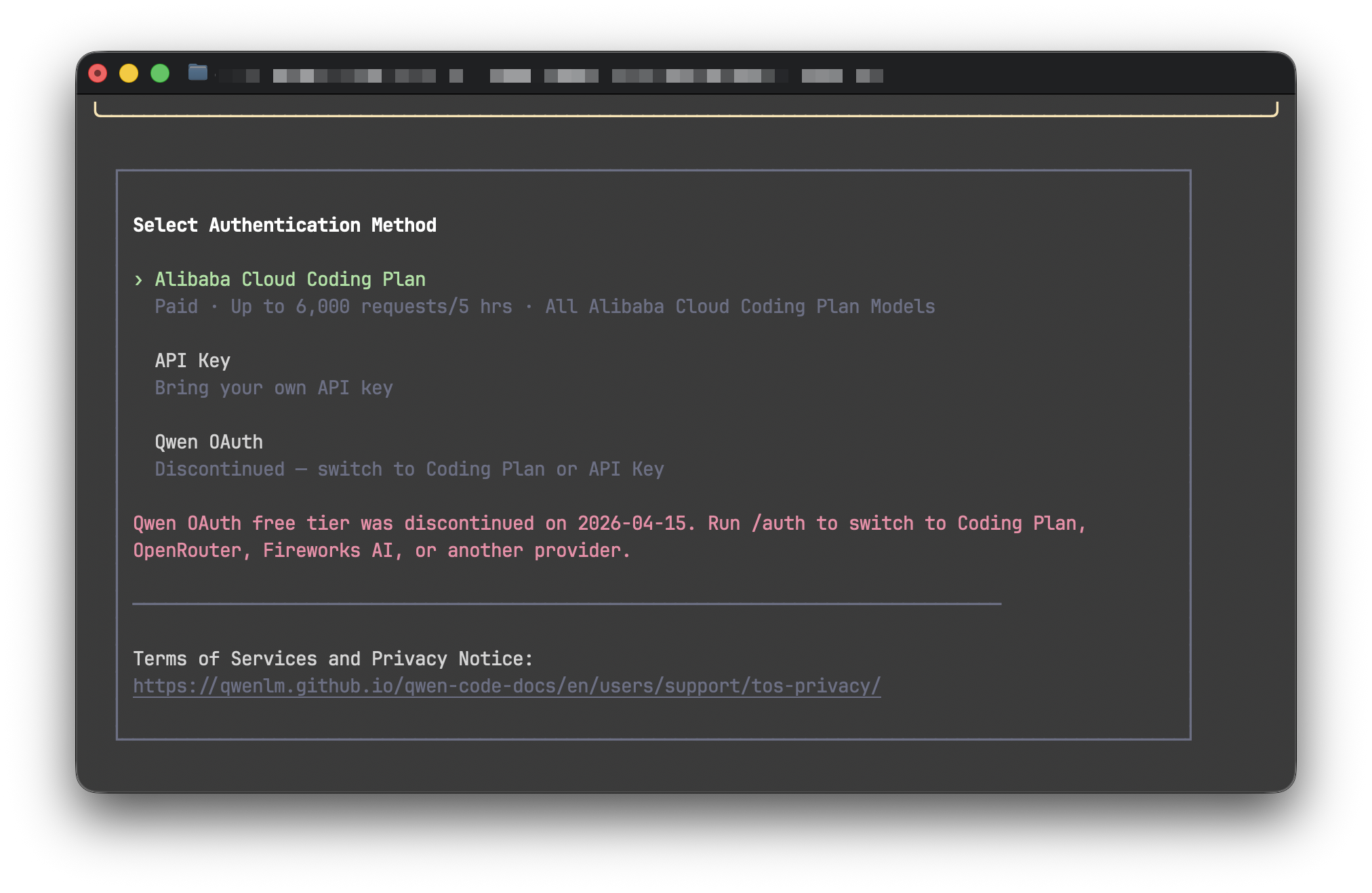
    And if you thought rate limiting, free AI trials, or other methods to squeeze as much AI out of Copilot are the sole, legendary dumb decisions of an ultra-capitalistic behemoth, you’re wrong. All of the models I’ve mentioned above are now behind a paywall or limited so much that working with them is nearly impossible. No more free AI for me. iFlow had at least the decency to inform people in advance that they’re shutting down the iflow CLI on April 17. The others? “Enter your API key here…”

    Authentication methods for Alibaba Cloud coding plan without free AI
    Thank you, qwen. It was a good run 🫡

    A’ight, let’s talk about rate limiting for a second. I hate it, users hate it, and definitely /r/GitHubCopilot hates it, too. However, all this nerfing of once world-class models and the systematic destruction of GitHub’s Copilot plan are just a symptom of something much bigger and darker to come.

    Everyone who’s ever used anything but ChatGPT.com knows that AI requires energy. Enormous amounts of energy. So much so that people start making plans to put data centers in space or to reopen recently closed nuclear facilities. But the data centers still on planet Earth are already at the maximum of their capacity, partly due to grandmas creating “funny” images or the occasional image of the US President who depicts himself as Jesus, whose bare hand can cure the sick.

    And energy is where the problem lies (not with Trump per se, even though one could make the argument that anything this geriatric man with hair like mummified foreskin ends up worse than it was before, so much so that his own military advisors locked him out of a room during a rescue mission of a pilot shot down over Iran because “Trump screamed at aides for hours”).

    The Great Scaling Back

    For the better part of two years, AI providers played the “growth at all costs” LARP with remarkable enthusiasm. They subsidized compute, incinerated mountains of venture capital like it was a renewable resource, and handed out access to frontier models as free AI like a street vendor handing out samples outside a tourist trap. The pitch was simple: get everyone hooked, worry about monetization later. It was the SaaS playbook, but turbocharged and run by people who apparently believed that “later” was someone else’s problem.

    Well. Later has arrived. And it brought a spreadsheet.

    The VC spigot hasn’t dried up entirely, at least not at the time I’m writing this, but the pressure to demonstrate actual revenue, meaning real money from real customers, not just “annualized run rate” accounting gymnastics, is mounting at every major AI lab. The entire idea of a free tier is being systematically dismantled. What was once a generous playground is becoming a controlled, highly restricted waiting room. You can sit, but don’t get too comfortable, and please note the subscription plans on your way out.

    Poe, Compute Points, and the Theater of Generosity

    Take Poe, for example. I had five working API keys rotating to use the back then recently released and cheap Gemini 3 Flash that allowed me basically unlimited usage of that model as my default chat model – free AI. What started as an impressively versatile aggregator (a single interface to Claude, GPT, Mistral, and whatever else Quora felt like plugging in that week) has gradually mutated into a convoluted “compute point” economy.

    Poe is a master in obfuscation. Instead of just saying “you get X messages per day,” they invented a currency. Compute points. It sounds vaguely scientific, almost noble, like you’re managing actual computational resources rather than just watching a progress bar drain toward a paywall. Different models cost different amounts of points, essentially the same business model that OpenRouter has been riding on for years. Some responses cost more based on length. It’s gamified poverty, not free AI.

    The message is clear: your access to “free AI” was never free. It was a very specific, very finite ration of digital oxygen. Once it’s gone, they’d like your credit card number, please.

    Even the Chinese Giants Are Building Fences

    Then there’s the contingent we thought might play a different game entirely. The Qwen ecosystem and the broader wave of Chinese AI development initially arrived with the energy of someone aggressively trying to steal market share at any cost, offering free AI left and right. Open weights, generous API tiers, competitive pricing – it had the whiff of a geopolitical strategy dressed up as altruism. And maybe it was. But running H100-equivalent clusters at scale swallows the same humongous amount of energy as it does in the West, and it isn’t a hobby for the bored billionaires. It’s expensive infrastructure, and infrastructure demands return.

    The fences are going up. The walled gardens are being reinforced with each model generation. “Open source” is rapidly becoming a term that means “you can inspect the weights, but good luck running them on anything you can actually afford.” The open-source dream is slowly being carved into “open enough to build hype, closed enough to make money.”

    I’m not writing this to be cynical. It’s just a pattern I see day in, day out. We’ve seen this movie before. Remember “serverless servers”, which were obviously servers, but hosted in “the cloud” where they could massively scale up or down and, if not under constant watch, can bankrupt an entire company? They, too, started out with every platform that ever offered generous access to developers before discovering that developers don’t pay the server bills.

    AI as a Utility, and What That Actually Means for You

    The industry is completing its pivot from “AI as a world-changing miracle” to “AI as a boring, commoditized utility.” And utilities – be they electricity, water, broadband, or now high-end LLMs – share one charming universal trait: once you’re dependent on them, they will monetize every single drop until your infrastructure budget looks like a hostage negotiation.

    Think about it. Ten years ago, AWS was the scrappy alternative. Now it’s the default, and the bills are large enough that entire engineering teams exist purely to optimize them. The same trajectory is playing out with AI, just compressed into a fraction of the time because compute costs are indefinitely higher and the pressure to monetize is much more acute.

    The “AI engineer” of 2025 who built their entire workflow on a free AI Claude account and a rotating cast of open API keys is about to experience the same rude awakening that the “serverless evangelist” of 2018 had when the Lambda bills arrived.

    The Part Where I Admit I’m Part of the Problem

    Look, I paid my $11.95 (incl. VAT). I did it with the resigned energy of a man who knows he’s lost a game he didn’t know he was playing. I’m not angry at GitHub. Microsoft needs to eat too, and the Copilot product is, well, let’s call it fine – that is, if you’re even lucky to get one. It does what it says on the tin. The autocomplete is good, the chat integration is useful, and “Claude Sonnet 4.6 inside my IDE” is a sentence I didn’t think I’d be writing without wincing.

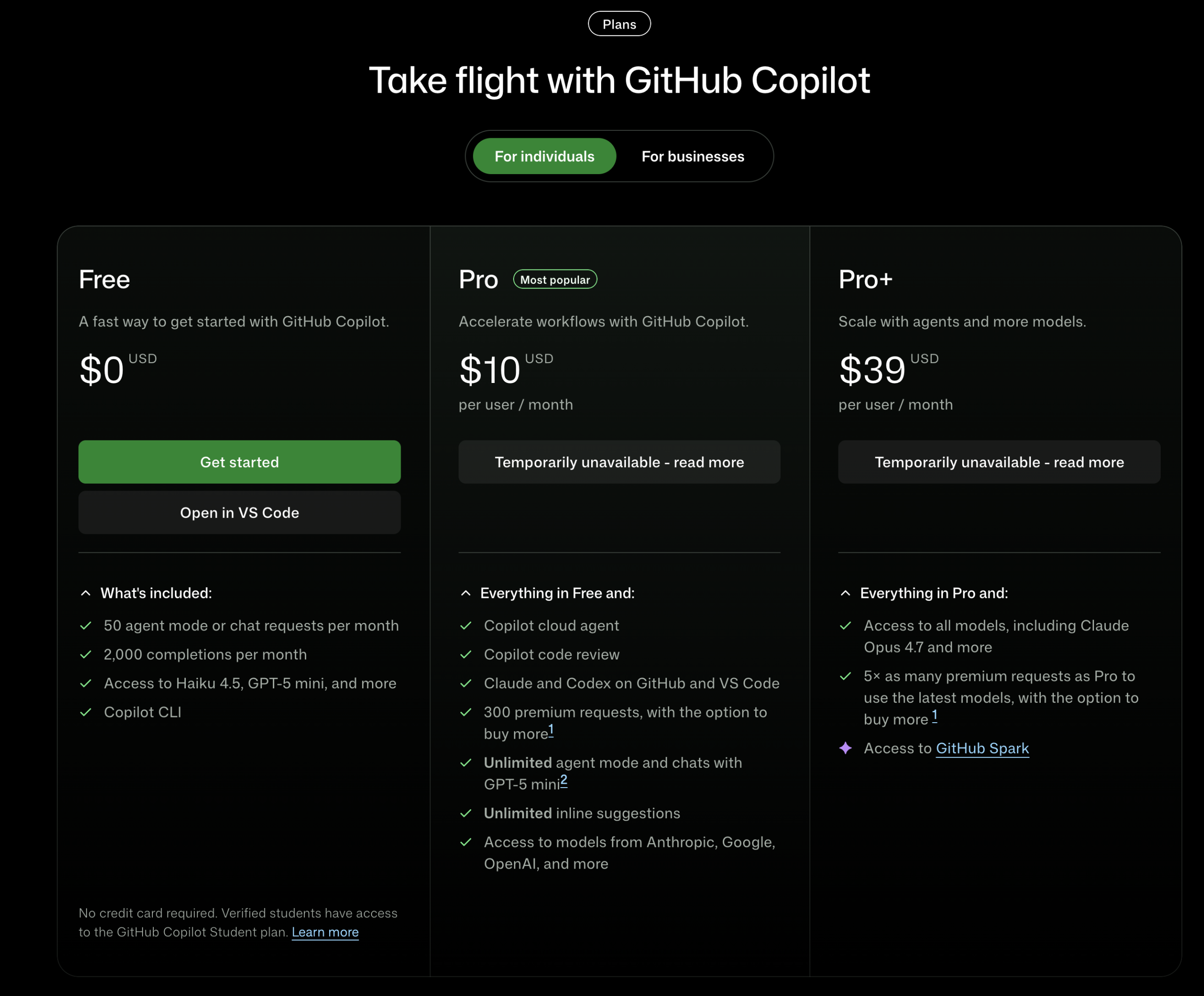
    Github copilot pricing plans
    Pricing page for github’s copilot as of april, 2026

    But I’m acutely aware that $10 is probably just the opening bid. GitHub just stopped all new registrations for their “Student”, “Pro”, and “Pro+” plans. The tiers will multiply. The limits will tighten further for free users. The Pro plan will quietly become what the free plan used to be, and a new “Pro+” will materialize above it with a straight face. “Free AI” will be a phrase of the past. This is how it works. This is how it has always worked.

    So, What Now?

    So, where does that leave us? Two pieces of advice: If you’re still riding the free-tier wave in 2026, you’re basically walking around with a “kick me” sign on your back. Enjoy the sunshine while it lasts, and it won’t last for long, that is already clear.

    Get your budget in order. Free AI isn’t coming back. AI isn’t a perk; it’s standard equipment. And “optional” infrastructure has a nasty habit of becoming a non-negotiable line item overnight. That era of “almost free” AI was just a collective fever dream fueled by irrational exuberance and sheer stupidity.

    The dream’s over. The bill is coming. I’ve already cleared mine. You’d better go check your own. The price probably just went up while you were reading this.

  • CORRECTION: The Pilot on the GitHub Aircraft Is Still There. He Just Isn’t Allowed To Touch Anything

    CORRECTION: The Pilot on the GitHub Aircraft Is Still There. He Just Isn’t Allowed To Touch Anything

    Let us pause and enjoy this moment of profound, digital humiliation of myself. I got it all wrong, the GitHub Copilot announcement. Yes, I should probably be tarred and feathered, or at the very least, stand in the drizzle on a gray marketplace in Pyongyang, awaiting the punishment announced by a committee of tiny North Korean claqueurs in badly-tailored, always too-big uniforms, whose pins and medals add nothing to their character but meaningless weight.

    (more…)
  • The rise and fall of ClawdBot (or whatever the hell it’s called today)

    The rise and fall of ClawdBot (or whatever the hell it’s called today)

    On November 25, 2025, the internet prostrated itself for yet another AI-based system. The name: ClawdBot. The promise: “Clears your inbox, sends emails, manages your calendar, checks you in for flights”. The problem: e-ve-ry-thing.

    It starts with the name itself. “ClawdBot” is only one of the names of this tool. Then there was “MoltBot”, which is today known as “OpenClaw.” The latter was chosen because “Clawd” sounded a bit too much like a trademark infringement lawsuit waiting to happen. Anthropic, whose lawyers gave much sharper “claws”, didn’t find the homage amusing. Alright, said the sole Austrian developer, Peter Steinberg, and changed it to “MoltBot.” What led to the (hopefully last) change to OpenClaw is unknown.

    ClawdBot, MoltBot, OpenClaw

    But it was too late. Thousands of people had already downloaded, used, and written glorifying reviews of what is now OpenClaw, including media giants like Forbes, Wired, and Axios. And when the ClawdBot references ended, and everyone switched to “MoltBot,” the name had already been changed again. This time to “OpenClaw,” which was released on January 4, 2026. With people like Alex Finn, founder and CEO of Creator Buddy (some kind of competitor), who called it the greatest AI application to date, like having a dedicated AI employee at your service around the clock.

    If you’re not confused at this point, you’re not paying attention. It took me a few hours to realize that all these products were, more or less, exactly the same. One thing stayed, though: The CLI command clawdbot. Checkmate, Anthropic!

    A close-up of a man, Davie504, with dark hair wearing white over-ear headphones, looking directly into the camera with a deadpan, intense expression as the word "CHECKMATE" appears in bold white text over his mouth.
    Checkmate, anthropic. Wait, not so fast.

    A’ight, so what the hell is ClawdBot MoltBot OpenClaw actually? Marketed as “the AI that actually does things,” OpenClaw runs directly on users’ operating systems and applications. It can automate tasks such as managing emails and calendars, browsing the web, and interacting with online services.

    What Problems does it solve? None

    Let’s pretend for a second that this actually works. I have a server running… what was the name again? Right, OpenClaw. So, a server running OpenClaw in the background and hooked up to whatever AI provider you wish; it works with almost everything. Before running it, I set up a Telegram bot. That’s your point of entry. Writing to your new “contact” is like writing a normal AI prompt. “Hey, create a new Vite.js project in my home directory. Some /-commands are available for quick configuration, but that’s it, in essence.

    The community was so excited, they forced the software into everything that has enough memory, from

    Raspberry Pis

    Raspberry pi terminal screenshot and tweet on black background
    Image #1 for “the rise and fall of clawdbot (or whatever the hell it’s called today)”

    to a freaking Tamagochi!

    Tweet about custom tamagotchi on e reader device
    Image #2 for “the rise and fall of clawdbot (or whatever the hell it’s called today)”

    Self-proclaimed “analysts” on LinkedIn, whose primary skill is formatting listicles and adding emojis to every line, announced the “dropping” of the “Ultimate ClawdBot Report,” which was viewed 41,434 times as of today.

    But even the reviews – at least the ones not written by the intern of the “Lifestyle” section of their news site – already saw a glimmer of problems on the horizon that has evolved into a gigantic shitstorm and is currently trashing the project – regardless of the name. X users are now frantically deleting their glorifying posts and acting like they “knew it from the beginning.” Yeah, John, sure.

    It’s a rare phenomenon that an open-source software grows explodes so fast, with almost everyone comparing it to an AI assistant personally engineered by Jesus Christ himself. And then, within merely weeks or just days, was nailed to the cross, stoned, and led to bleed to death in the smoldering sun of a toxic open-source community.

    And the whole debate has just started.

    “From magick to malware”

    The security flaws were plentiful, to put it mildly. Leaking actual API keys, sucking up bandwidth for training, and payload injection are only some of the “200+ safety issues” my new adopted country claims to have.

    The awesome guys at Cisco.com went into more detail and weren’t afraid to call ClawdBot a “security nightmare.” They went so far as to add ClawdBot to their security tool, which exposes the app’s tool poisoning and command injection, just to name a few. The biggest flaw: the possibility of adding malicious MoltBot ClawdBot skills used to push password-stealing malware.

    Even my favorite and dearly loved password manager, 1Password, which is one of my must-have apps, warned users using ClawdBot with a bold headline, “From magick to malware,” that is as essential as the Epstein files. I could list a ton of other articles explaining what’s wrong with this assistant, but I don’t think that’s necessary. What is necessary is one thing to keep in mind:

    AI-driven Software can be as unsafe as renting a scooter in Phuket with zero experience and a flip-flop on one foot, even if the developer swears the “brakes are brand new.”

    A Cautious Tale of Open-Source Projects

    I, too, toyed with OpenClaw over the weekend. The old URL clawd.bot now redirects to openclaw.ai, after the presumably preferred .bot domain was snatched away on January 29, 2026. It took me a while to really install and get it to work. Before letting it go rogue on my server, which hosts, among others, this blog, which has the SEO ranking of a Geocities page dedicated to hamster funerals.

    So I chose to install it on my iMac. One line, an install script, that’s all it needed—that was the promise. Of course, this wasn’t the case, and I ended up downloading the GUI version to get at least some visual ideas of what’s going wrong and how to get this thing started.

    In the end, I managed. I hooked up to Telegram via creating a bot and tested a few LLMs – Gemini 2.5 Flash-Lite, Minimax 2.1, Qwen3 – by “chatting” with it and giving it the occasional, harmless command (“Create a Markdown file containing a poem of Alpacas on my Desktop”). It worked, technically. But so does a sundial at night if you have a flashlight: It moved with the urgency of a granddad browsing Netflix. The slash commands themselves were as fast as you’d expect. But general text queries took – and I counted this a dozen times – 4-5 seconds.

    The last thing I tried was creating a Telegram group, thinking I could share this awesome assistant with my wife, whose employer recently underwent a hostile takeover by the Chinese and immediately saved the biggest unnecessary by banning everything from free water to bringing your own fan in a country where the temperatures are over 32 °C (90 °F, for the less educated) for 360 days of the year.

    API Keys needed? Just hack ClawdBot

    Spoiler alert: It failed harder than a junior developer on their first deploy on a Friday afternoon. I managed to get a group running (wow!), invited my assistant (Minimax 2.1, which I felt was the best choice for this), and was also able to give it commands. However, my dear wife was entirely ignored. So much about my experience.

    And then I asked myself: What problem does this solve? I mean, what actual problem? Or, to say it with the checklist of one optimistic X user who thought ClawdBot, or whatever it was called back then, was the perpetuum mobile of churning through arduous tasks:

    • wake up on time
    • not lay in bed scrolling
    • exercise
    • eat a healthy breakfast
    • avoid procrastinating
    • stop panic anxiety loops
    • focus on work
    • make sweet love

    Needless to say, none of this was my problem. And call me old-fashioned, but I prefer to fuck my wife personally. If I wanted a lifeless, automated interaction, I’d just use JIRA.

  • Finding your cat memes just got easier: My free “AI Image Renamer” script renames your image files to what they actually show

    Finding your cat memes just got easier: My free “AI Image Renamer” script renames your image files to what they actually show

    AI Image Renamer is a small Python script you don’t want to miss. AI—like any other tool—exists to make our lives easier, to solve problems, or to take over tasks that we’re simply too lazy for. A quick search on GitHub for AI-related scripts or apps, though, often doesn’t seem to follow that pattern. In fact, it’s the complete opposite: quite a few tools using AI in one form or another solve problems that nobody has.

    (more…)
  • Zed That Again, Please: An Offensively Subjective and Brief Look at “The editor for what’s next”

    Zed That Again, Please: An Offensively Subjective and Brief Look at “The editor for what’s next”

    IDEs, Integrated Development Environments, or simply code editors, are where web developers like me spend most of their time staring at. And in an industry where developers go to war and religiously fight tooth and nail over which JavaScript framework or bundler is the best, IDEs themselves aren’t excluded.

    Until all these AI editors like Cline and Cursor came out (fuck them), the war was basically between two products: WebStorm and Visual Studio Code. I’ve always been a loyal fan of JetBrains’ products, the company that produces IDEs like WebStorm, PyCharm, and other specialized IDEs for all operating systems. But then I stumbled upon a tiny code editor that—as you will see soon—I refuse to call an IDE, but a brilliant code editor: Zed.

    Introducing: Zed

    It’s not hard to find favorable words for Zed. It’s blazingly fast, it supports all operating systems, it’s free, it comes with AI support, including free ones. It’s open-source, it receives updates almost on a daily basis, and available themes are plentiful. The makers of Zed itself sell their code editor more by being yet another editor with AI and LLM capabilities, which definitely doesn’t do the product justice:

    Zed is a next-generation code editor designed for high-performance collaboration with humans and AI.

    A feature that surprised me a lot was that it’s collaborative. You can create channels with your teammates to chat, to share your screens, or to simultaneously work on a product. A feature that even my beloved JetBrains “Code-with-Me” plugin struggles with from time to time.

    You can also connect to a project on your server via SSH. I do this all the time if I make small changes to projects that aren’t controlled via Git, and it’s amazing.

    Remember Sublime? Well, just like with Sublime, Zed allows you to edit in a not-so-user-friendly but effective way by editing its settings.json. Luckily, most values do have autocomplete, so you know what options can go in what value.

    And what if something’s unclear or doesn’t work? Zed’s documentation is a prime example of how important documentations are. And if you’re really out of luck, well, then join Zed’s Discord server, and even the developers themselves answer your questions in mere minutes.

    A (Slightly) Deeper Look

    Let’s dive a little deeper into this small but feature-rich editor. Since I’m too lazy to reset all of my configurations and factory-reset the editor only for this piece, this is how it looks once you’ve downloaded it:

    Pretty minimalistic, huh? That’s what I thought, too. The only thing I did was change the theme (and it has a lot of them). The tiny buttons all around the editor are actually the major buttons, so don’t mistake them for irrelevant stuff.

    I’m not going to explain every single button, but to point something out, I need to highlight the two star-like buttons on the right side, at the top and at the bottom. The top one is the “Inline Assistant.” If you’ve some experience with AI editors, this doesn’t need further explanation: It opens a narrow input window wherever your cursor is and lets you enter a prompt. This is useful when you’re in the middle of a function, for example, and want to change what the function returns, or something like that. You can then highlight the function, or only the section, enter your prompt.

    You can change your AI model, go through your prompt history, and do a few other things whose meaning I haven’t figured out yet.

    But since it is a prompt, you can also use it as a general prompt. Create an empty file and say: “Create an HTML file.” It’ll precisely do that, depending on your model, whether thorough or not, and then you have a base HTML file. You can also go a step further and give it a real prompt:

    Create an HTML file in dark mode for my elephant sanctuary website.

    It then shows you the preview of what it would add if you clicked the blue checkmark on the right side of the prompt window. Or you say “fuck it” and ESC your way out of it or click the opposing “X”.

    By the way, this prompt I wrote, I’ve just come up with this as I’m writing. So, I’m curious what the result will be. One prompt, slightly detailed, and that’s it. I left the LLM at GPT-4.1 because it’s fast and relatively good for not-too-complex tasks.

    Let’s give it a try.

    The prompt:

    The LLM changes:

    The end result:

    View it yourself on this link…

    It did exactly what I’ve asked for, but, of course, it filled out the gaps itself (what’s the layout’s form? What image do you want to use for the hero section? …) In my opinion, this is quite a lot for the tiny prompt I gave. But the credits go more to the LLM than Zed itself, since it’s the model that does the code.

    The star-like button on the bottom is more or less the same. It just takes into account the entire file, and not just a selected portion. Entering the same prompt with an empty .html document yields the same outcome, so I spare you with that.

    The other buttons: figure it out yourself! They’re mostly self-explanatory anyway.

    What’s the Beef?

    So, at this point, you might—quite rightly—ask: “Hey, Kolja, what’s the beef here?” The beef is in its speed (written in Rust); no other code editor launches this fast. It’s the fact that you have almost complete freedom in how this editor works. And it comes with mostly every utility a heavy IDE would come with, at least the ones that people actively use (who uses a “JS debugger” anyway? It’s console.log(), for fucks sake!).

    It has a little flavor of Visual Studio Code, which I won’t touch with a ten-foot pole because it feels as if I’m developing in a web browser, but only a bit, and depending on one of the many themes you can download (I use “JetBrains Fleet”) The focus here is what I always love about apps: minimalism.

    When AI Becomes as Annoying as Fruit Flies

    Minimalism. That’s not entirely what Zed sells itself with. On their homepage, it describes Zed as follows:

    Zed is a next-generation code editor designed for high-performance collaboration with humans and AI.

    I’ve no idea what “next-generation” means in terms of features, but “designed for high-performance collaboration” and “AI” is something I do understand. And therein lies a little bit of the problem.

    I lost count of how many AI-centric IDEs and code editors are being released every month. Some turn out to be simply a fork of another editor, while others are fanatic “Cline” or “Cursor” (which is currently pissing off customers left and right with their new pricing policy) fans. Nothing can sway them away from these tools.

    I find this problematic, but this has more to do with my personal view of AI-assisted coding than Zed itself. Just so much: AI, in my personal opinion, is an amazing tool that can help you figure out problems, debug unreadable error messages, tell you where you fucked up and a lot more.

    Did you notice? I said “tool”. Most people want an editor that does everything for them. When the output isn’t exactly as they want it to be, they’ll bombard it with prompts until it’s right. This is called “vibe coding,” a term that, for some reason, pisses me off.

    The period of the Industrial Revolution witnessed a quantum leap in industrial production. New sources of energy and power, especially coal and steam, replaced wind and water to create labor-saving machines that dramatically decreased the use of human and animal labor.

    This is a quote from a book called “The Industrial Revolution and Its Impact on European Society” 1 (emphasis added by me), and the meaning is clear: people looked for tools to help them with the stuff they didn’t want to do. These days, AI takes over everything. Where’s the fun in that? Where’s this proud feeling that you get when you figure out something on your own, and then it fucking works! How do I discover a totally unrelated programming language or technology that I’ve never been aware of before?

    AI editors turn the Industrial Revolution ad absurdum; they flipped it around. Instead of doing the boring tasks, it now does more or less everything, including the parts that are fun and, from a technical point of view, better suited to be done by a human (think security).

    Zed, unfortunately, jumped on the hype train of Cursor and so on, and focuses too much on AI, which is somewhat of a turn-off for me. It gets surreal when you open the editor to write plain text, and once a few lines have been written, it offers you words that you’ve written before, which make no sense in the sentence you’re writing. Writing-autocomplete, what the fuck? I didn’t ask for that much AI intrusion.

    So I find myself sometimes purposefully disabling the AI features, or simply not using them. I know it takes longer, I know there might be bugs in there. But:

    Zed That Again, Please: An Offensively Subjective and Brief Look at "The editor for what's next" — 2
    Image #3 for “zed that again, please: an offensively subjective and brief look at “the editor for what’s next””

    What I Used Zed Mostly For

    “So, Kolja, what did you use Zed for, then?” you may ask. And I can tell you: I use it as a default opener for all file types that aren’t connected directly to an app I’ve chosen. I use it to quickly jot down some information. I use it to paste old code in there in case some AI fucks my working code all up. Sure, every now and then I use a bit of the AI features, like filling up a long array or objects, or giving every HTML element some attribute. You know, things that are just tedious and not fun.

    Conclusion

    In the end, I’ve decided on a clear division of labor on my workstation. Programming in its respective JetBrains IDE (WebStorm, PhpStorm, PyCharm, …), and everything else Zed. It includes .txt, .sh files, .json, weird macOS-only .plist files, or when I’m not even sure what is in them (think dot-files like .config). To me, this makes the most sense. And if I need AI: Yeah, tell me one IDE that doesn’t have GitHub Copilot or its own proprietary LLM.

    Of course, for writing, I still use my one-and-only Markdown editor, Typora, which I’ve mentioned in my “What’s in my /Applications” before. And .pdf or .mp4 files are, obviously, also a no-go. But if I need to quickly jot down an email address while I’m on an audio call, Zed’s super-sonic launch speed will be the first app I click.

    You won, Zed. Almost.

    Footnotes

    1. The Industrial Revolution and Its Impact on European Society“, p. 582, first paragraph ↩︎
  • Using BoltAI’s Shell Plugin to Automate Tedious and Boring Tasks with Groq

    Using BoltAI’s Shell Plugin to Automate Tedious and Boring Tasks with Groq

    I know, I know, the AI hype train has long left the station, and it’d be rather embarrassing to explain for the millionth time what AI (or, to be precise, generative AI), how they work, and what prompts yield the best results for whatever you’re using it for.

    But there’s one feature that, at least according to my observations, is rarely touched: plugins. Let me give you just one example of how it can automate a whole chain of commands with just one prompt.

    (more…)